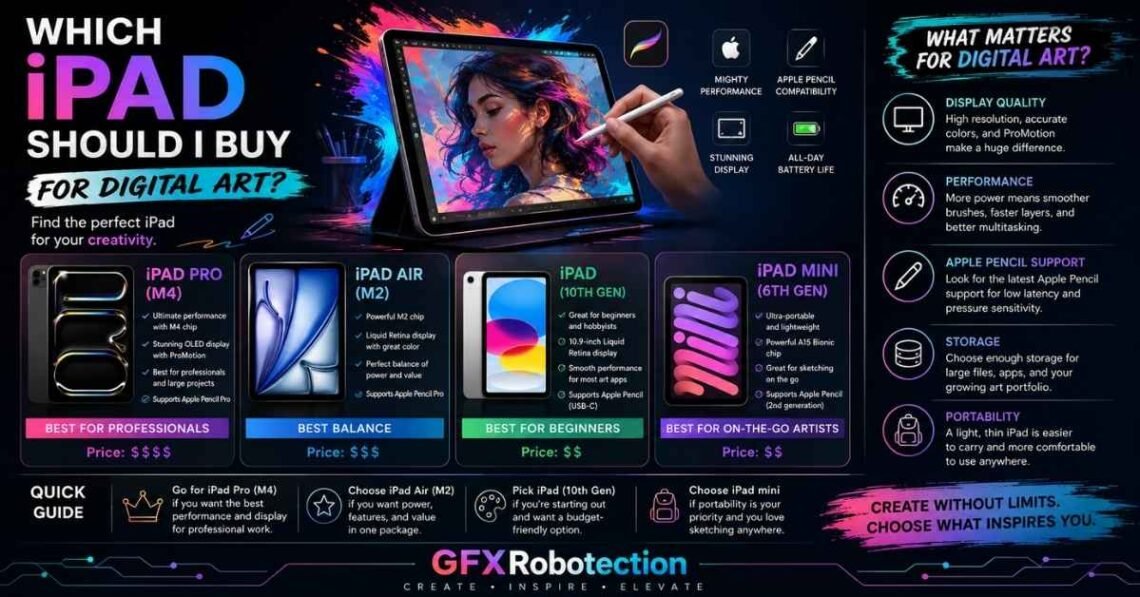
Which iPad should I buy for digital art GFXRobotection? For most artists, the iPad Air offers the best balance of performance, Apple Pencil support, display quality, portability, and value for money. If you’re a professional illustrator, animator, or designer working on large projects, the iPad Pro is the better investment thanks to its powerful M-series chip, advanced display, and smoother drawing experience. Beginners or students on a tighter budget can confidently start with the standard iPad, provided it supports the Apple Pencil that fits their workflow.
Choosing the right iPad isn’t just about buying Apple’s newest device. It’s about matching the hardware to your creative goals, favorite apps like Procreate, Clip Studio Paint, or Adobe Fresco, and your budget. This guide explains everything you need to know—from display quality and Apple Pencil compatibility to storage, accessories, and long-term value—so you can make a confident decision.
Short Answer: Which iPad Is the Best Choice?
If you don’t have time to read the full guide, here’s a quick recommendation.
| User Type | Best iPad | Why It Stands Out |
|---|---|---|
| Most Users | iPad Air | Excellent balance of price, performance, and portability |
| Professional Artists | iPad Pro | Superior display, performance, and Apple Pencil features |
| Students | iPad Air | Long software support and strong value |
| Beginners | Standard iPad | Affordable entry into digital art |
| Traveling Artists | 11-inch iPad Air or Pro | Lightweight and easy to carry |
Quick Recommendation: Unless your work involves complex illustrations, animation, or very large canvases, the iPad Air is the smartest purchase for most digital artists.
Before You Spend Hundreds of Dollars, Read This
Buying an iPad for art is exciting, but it’s also easy to overspend on features you may never use.
Many artists assume they need the most expensive model because professionals use it. In reality, your drawing style, preferred apps, and daily workflow matter far more than having the fastest processor.
Ask yourself:
- Are you learning digital art or earning from it?
- Will you mainly sketch or create large commercial illustrations?
- Do you need portability or a larger screen?
- How long do you expect to keep your iPad?
Answering these questions first makes choosing the right device much easier.
The Biggest Buying Mistakes Artists Make
Many first-time buyers regret their purchase because they focus on specifications instead of practical use.
Common mistakes include:
- Buying an iPad Pro when an iPad Air would have been enough.
- Choosing only 64GB or 128GB of storage for large art projects.
- Forgetting to budget for the Apple Pencil.
- Ignoring compatibility between the iPad and the Apple Pencil model.
- Buying an older device with limited future software support.
Avoiding these mistakes can save you money while giving you a better drawing experience.
How to Choose the Right iPad for Your Art Style
Different types of artists have different needs. Choosing an iPad based on your creative workflow is much more helpful than simply buying the most powerful model.
Casual Sketching
If you enjoy drawing as a hobby, an iPad Air or even the standard iPad is more than capable. These models handle sketching apps smoothly and are lightweight enough to carry anywhere.
Character Illustration
Illustrators who spend hours working on detailed characters benefit from a larger display, better color accuracy, and responsive Apple Pencil performance. The iPad Pro excels in this area.
Comics and Manga
Comic artists usually work with multiple layers and detailed line art. More RAM, higher storage, and a larger display make long drawing sessions much more comfortable.
Graphic Design
Graphic designers often switch between apps like Affinity Designer, Adobe Fresco, and Canva. A powerful processor and accurate display help maintain a smooth workflow across these creative applications.
Animation
Animation projects demand more processing power and storage. If you’re serious about animation, the iPad Pro provides extra headroom for demanding creative workloads.
Which iPad Is Best for Different Types of Artists?
Beginners
If you’re just starting, avoid overspending. The standard iPad or iPad Air offers everything you need to learn digital illustration.
Students
Students need portability, battery life, and long-term software support. The iPad Air remains one of the strongest choices because it balances price with professional-level performance.
Freelancers
Freelance illustrators often work with clients, edit large files, and manage multiple projects. Investing in additional storage and a reliable Apple Pencil can improve productivity.
Professional Artists
Professionals who create high-resolution illustrations, concept art, or commercial graphics every day will appreciate the iPad Pro’s advanced display technology and powerful hardware.
Complete iPad Comparison
| Feature | Standard iPad | iPad Air | iPad Pro |
|---|---|---|---|
| Performance | Good | Excellent | Outstanding |
| Apple Pencil Support | Yes | Yes | Yes |
| Display Quality | Very Good | Excellent | Best Available |
| Color Accuracy | Good | Excellent | Professional Grade |
| Portability | Excellent | Excellent | Very Good |
| Large Canvas Performance | Good | Very Good | Excellent |
| Long-Term Value | Good | Excellent | Excellent |
iPad Air vs iPad Pro: Which One Is Actually Worth Buying?
This is the comparison most buyers struggle with.
Choose the iPad Air if:
- You primarily create illustrations.
- You use Procreate regularly.
- You want excellent value.
- You need a lightweight device for travel.
- You don’t require the most advanced display features.
Choose the iPad Pro if:
- You work professionally every day.
- You create very large, detailed artwork.
- You edit photos and videos alongside illustrations.
- You value the best display Apple offers.
- You plan to keep the device for many years.
For many artists, the iPad Air offers nearly all the functionality of the Pro while costing significantly less.
Choosing the Right Apple Pencil
Your Apple Pencil is just as important as the iPad itself.
Consider:
- Apple Pencil Pro for advanced creative features.
- USB-C Apple Pencil for everyday drawing.
- Compatibility with your chosen iPad model.
- Pressure sensitivity and responsiveness.
- Long drawing sessions and charging convenience.
A great stylus dramatically improves the overall drawing experience, especially in apps like Procreate, Clip Studio Paint, and Adobe Fresco.
How Much Storage Do You Really Need?
Storage is one of the most overlooked buying decisions.
| Storage | Recommended For |
|---|---|
| 128GB | Beginners and casual artists |
| 256GB | Most freelancers and students |
| 512GB | Professional illustrators |
| 1TB+ | Heavy creative workloads and large projects |
If you work with many high-resolution illustrations, additional storage quickly becomes worthwhile.
Which iPad Should I Buy for Digital Art GFXRobotection?
Which Screen Size Is Better for Digital Art?
Choosing the right screen size is almost as important as choosing the iPad itself. A larger display provides more drawing space, while a smaller one is easier to carry.
11-inch iPad
The 11-inch iPad is ideal if you:
- Travel frequently.
- Draw in cafés, classrooms, or on public transport.
- Prefer a lightweight device.
- Create illustrations with moderate canvas sizes.
Its portability makes it a favorite among students, freelancers, and hobbyists.
13-inch iPad
The 13-inch iPad offers a larger digital canvas, making it easier to work on detailed illustrations and complex projects.
It is better suited for:
- Professional illustrators
- Comic artists
- Concept artists
- Graphic designers
- Digital painters
Although it is heavier, many professionals appreciate the additional workspace.
Which Size Fits Your Workflow?
If portability is your priority, choose the 11-inch model.
If you spend hours creating detailed artwork every day, the 13-inch display offers a more comfortable drawing experience.
Best iPad for Every Budget
One of the biggest mistakes buyers make is assuming they need Apple’s most expensive tablet.
Best Under $400
If you’re just starting digital art, a standard iPad paired with a compatible Apple Pencil provides excellent value.
Ideal for:
- Beginners
- Students
- Hobby artists
- Casual sketching
Best Under $700
The iPad Air is widely considered the sweet spot.
It offers:
- Powerful M-series chip
- Excellent display
- Apple Pencil support
- Long software support
- Outstanding performance in Procreate, Adobe Fresco, and Affinity Designer
For most artists, this is the best overall investment.
Premium Budget
If your income depends on illustration, animation, or graphic design, the iPad Pro justifies its higher price.
Its advanced display, smoother refresh rate, and additional processing power make demanding creative work more enjoyable.
Best iPad for Popular Drawing Apps
Different creative applications place different demands on hardware.
| App | Recommended iPad | Why |
|---|---|---|
| Procreate | iPad Air / Pro | Smooth drawing and excellent Apple Pencil support |
| Clip Studio Paint | iPad Pro | Handles larger projects efficiently |
| Adobe Fresco | iPad Air / Pro | Strong Adobe integration |
| Affinity Designer | iPad Air / Pro | Great for vector illustration |
| Concepts | Standard iPad and above | Works well for sketches and planning |
| Nomad Sculpt | iPad Pro | Better suited for intensive 3D workflows |
The iPad Air comfortably handles most creative software, while the iPad Pro is preferable for advanced multitasking and resource-intensive projects.
Real-World Performance: What Actually Matters?
Many buyers focus on processor names, but artists care more about the drawing experience.
Display Quality
A high-quality display improves:
- Color accuracy
- Contrast
- Brightness
- Viewing angles
This is especially valuable for professional illustration and branding work.
Apple Pencil Performance
A responsive stylus makes digital drawing feel more natural.
Look for:
- Low latency
- Accurate pressure sensitivity
- Palm rejection
- Tilt recognition
- Comfortable grip
These features directly influence sketching and painting quality.
RAM and Layer Limits
Applications such as Procreate limit the number of layers based partly on available memory.
If you regularly create detailed illustrations with dozens of layers, choosing a more powerful model can provide greater flexibility.
Battery Life
Artists often spend several hours drawing continuously.
A device with dependable battery life allows uninterrupted creative sessions whether you’re working from home, a studio, or while traveling.
Accessories Worth Buying
The iPad is only part of your creative setup.
Some accessories genuinely improve productivity.
Apple Pencil
Without question, this is the most important accessory for digital artists.
Paper-Feel Screen Protector
Many artists prefer a textured screen protector because it creates a drawing experience that feels closer to traditional paper.
Adjustable Stand
A good stand reduces neck and wrist strain during long illustration sessions.
External Storage
Large PSD files, reference images, and project backups quickly consume storage.
External drives or cloud storage help keep projects organized.
Protective Case
A durable case protects your investment during travel while also providing additional comfort during extended drawing sessions.
Common Buying Mistakes to Avoid
After helping many artists choose the right device, the same mistakes appear repeatedly.
Buying Too Much Power
Many beginners purchase an expensive iPad Pro even though an iPad Air would meet all their needs.
Choosing Too Little Storage
Creative files grow quickly.
Buying additional storage now is usually cheaper than replacing the device later.
Ignoring Apple Pencil Compatibility
Not every Apple Pencil works with every iPad.
Always verify compatibility before purchasing.
Buying an Older Model Without Research
Older iPads may seem like bargains, but limited software support could shorten their useful lifespan.
Forgetting Accessory Costs
Remember to budget for:
- Apple Pencil
- Protective case
- Screen protector
- Cloud storage
- USB-C accessories
These costs add up quickly.
Practical Buying Scenarios
Student Artist
A university student primarily creating illustrations in Procreate usually benefits most from an iPad Air with 256GB of storage.
It balances affordability, portability, and long-term usability.
Freelance Illustrator
A freelancer managing multiple client projects every week should consider an iPad Pro if large canvases and demanding workflows are common.
Graphic Designer
Designers creating logos, branding, marketing graphics, and UI concepts often find the iPad Air provides outstanding value while still delivering professional-level performance.
Hobby Artist
If drawing is primarily for enjoyment, there’s little reason to overspend.
A standard iPad remains an excellent introduction to digital art.
Professional Studio Artist
Artists working daily with complex illustrations, concept art, animation, or commercial design may benefit from the advanced display and performance of the iPad Pro.
Case Study
Sarah is a freelance illustrator who upgraded from a standard iPad to an iPad Air. Her workflow involved Procreate, Adobe Fresco, and occasional Affinity Designer projects. The Air provided noticeably faster performance, more storage options, and better Apple Pencil support without requiring the higher investment of an iPad Pro. For her client work, it delivered the right balance of cost and capability.
Which iPad Should I Buy for Digital Art GFXRobotection?
Is an iPad Better Than a Drawing Tablet?
Many first-time buyers compare an iPad with dedicated drawing tablets from Wacom, Huion, or XP-Pen. The right choice depends on how and where you create art.
| Feature | iPad | Drawing Tablet |
|---|---|---|
| Portable | ✅ Excellent | ❌ Usually requires a computer |
| Standalone Device | ✅ Yes | ❌ Most require a PC or Mac |
| Drawing Apps | Procreate, Clip Studio Paint, Adobe Fresco, Affinity Designer | Photoshop, Illustrator, Clip Studio Paint |
| Entertainment | ✅ Movies, games, web browsing | ❌ Drawing only |
| Battery | ✅ Built-in | Depends on the model |
| Learning Curve | Easy | Moderate |
Choose an iPad If:
- You want an all-in-one creative device.
- You enjoy drawing anywhere.
- You need portability for school, travel, or work.
- You also use your tablet for productivity and entertainment.
Choose a Drawing Tablet If:
- You already own a powerful desktop computer.
- You primarily work in Photoshop or Illustrator.
- You prefer a larger desktop workspace.
- You don’t need a standalone device.
For most beginners and freelancers, an iPad offers the best balance between creative flexibility and everyday usability.
Is Buying a Refurbished iPad Worth It?
A refurbished iPad can be an excellent way to save money without sacrificing performance.
Advantages
- Lower purchase price
- Better value for your budget
- Environmentally friendly
- Access to higher-end models at reduced cost
Things to Check Before Buying
Always verify:
- Battery health
- Screen condition
- Apple Pencil compatibility
- Remaining warranty
- Return policy
- Software support
- Storage capacity
Buying from a trusted retailer or Apple’s certified refurbished program generally provides greater peace of mind than purchasing from unknown sellers.
How Long Will an iPad Last for Digital Art?
One of the biggest concerns artists have is longevity.
Fortunately, iPads typically receive software updates for many years, making them one of the most future-proof creative devices available.
Factors that influence lifespan include:
- Processor generation
- Available RAM
- Battery health
- Storage capacity
- Frequency of software updates
- Your workload
A well-maintained iPad Air or iPad Pro can comfortably serve digital artists for several years.
Expert Tips Before You Buy Which iPad Should I Buy for Digital Art GFXRobotection
Before making your final decision, keep these practical tips in mind.
Prioritize Apple Pencil Compatibility
The Apple Pencil has a greater impact on your drawing experience than many hardware specifications. Always confirm compatibility before purchasing.
Buy for Your Current Workflow
Don’t purchase the most expensive model simply because it’s available.
Choose the iPad that matches:
- Your experience level
- Your software
- Your budget
- Your typical projects
Think Long-Term
If you plan to keep your iPad for several years, investing in additional storage can prevent future limitations.
Protect Your Investment
Use:
- A protective case
- A quality screen protector
- Cloud backups
- External storage for large projects
Small accessories can significantly extend the life of your device.
LEARN MORE: How Digital Technology Shapes Us GFXRobotection
Quick Buying Checklist about Which iPad Should I Buy for Digital Art GFXRobotection
Before placing your order, make sure you have considered:
- ✅ Your budget
- ✅ Apple Pencil compatibility
- ✅ Storage requirements
- ✅ Preferred screen size
- ✅ Favorite drawing apps
- ✅ Long-term software support
- ✅ Accessories you’ll need
- ✅ Warranty or return policy
Following this checklist can help you avoid common purchasing mistakes.
Frequently Asked Questions about Which iPad Should I Buy for Digital Art GFXRobotection
Which iPad is best for digital art?
For most people, the iPad Air is the best choice because it delivers an excellent combination of performance, display quality, Apple Pencil support, portability, and price.
Is the iPad Pro worth the extra money?
Yes—but mainly for professionals.
If you regularly create high-resolution illustrations, animations, or commercial artwork, the iPad Pro provides additional performance and a premium display. Casual artists and students will often find the iPad Air offers better overall value.
Is the iPad Air powerful enough for Procreate?
Absolutely.
The iPad Air runs Procreate, Clip Studio Paint, Adobe Fresco, Affinity Designer, and other professional creative applications smoothly for most users.
How much storage should I buy?
A good guideline is:
- 128GB for beginners.
- 256GB for most artists.
- 512GB or more for professionals handling large files and multiple creative apps.
Which Apple Pencil should I buy?
The best option depends on your iPad model.
If your device supports Apple Pencil Pro, it offers advanced features that benefit many artists. Otherwise, purchase the compatible Apple Pencil recommended for your specific iPad.
Is a 120Hz display important?
Professional artists who draw for many hours each day often appreciate the smoother visual experience. However, many beginners and hobbyists will still enjoy an excellent drawing experience on standard refresh-rate displays.
Can an iPad replace a drawing tablet?
For many people, yes.
An iPad combines portability, professional drawing software, productivity tools, and entertainment in a single device. Artists who rely heavily on desktop workflows may still prefer dedicated drawing tablets.
Final Recommendation: Which iPad Should You Buy?
If you’re still unsure, here’s a simple summary.
| User | Recommendation |
|---|---|
| Best Overall | iPad Air |
| Best Budget Option | Standard iPad |
| Best Professional Choice | iPad Pro |
| Best for Students | iPad Air |
| Best Long-Term Value | iPad Air |
| Best Performance | iPad Pro |
Final Verdict About Which iPad Should I Buy for Digital Art GFXRobotection
Choosing the right iPad isn’t about buying the newest or most expensive model—it’s about selecting the one that supports your creative goals.
For the majority of artists, the iPad Air stands out as the best overall choice. It offers outstanding performance, excellent display quality, strong Apple Pencil support, and enough power to run professional apps like Procreate, Clip Studio Paint, Adobe Fresco, and Affinity Designer with ease.
If you’re a professional illustrator, concept artist, animator, or someone who works on large, demanding projects every day, the iPad Pro is worth the additional investment for its superior display and performance.
Meanwhile, beginners, students, and hobbyists can confidently start with the standard iPad, making digital art more accessible without overspending.
Ultimately, the best iPad is the one that fits your budget, workflow, preferred software, and long-term creative ambitions. By considering factors such as Apple Pencil compatibility, storage, screen size, display quality, and future software support, you’ll make a purchase that continues to support your artistic journey for years to come.
The best creative tool isn’t necessarily the most expensive—it’s the one that helps you create consistently, comfortably, and confidently.