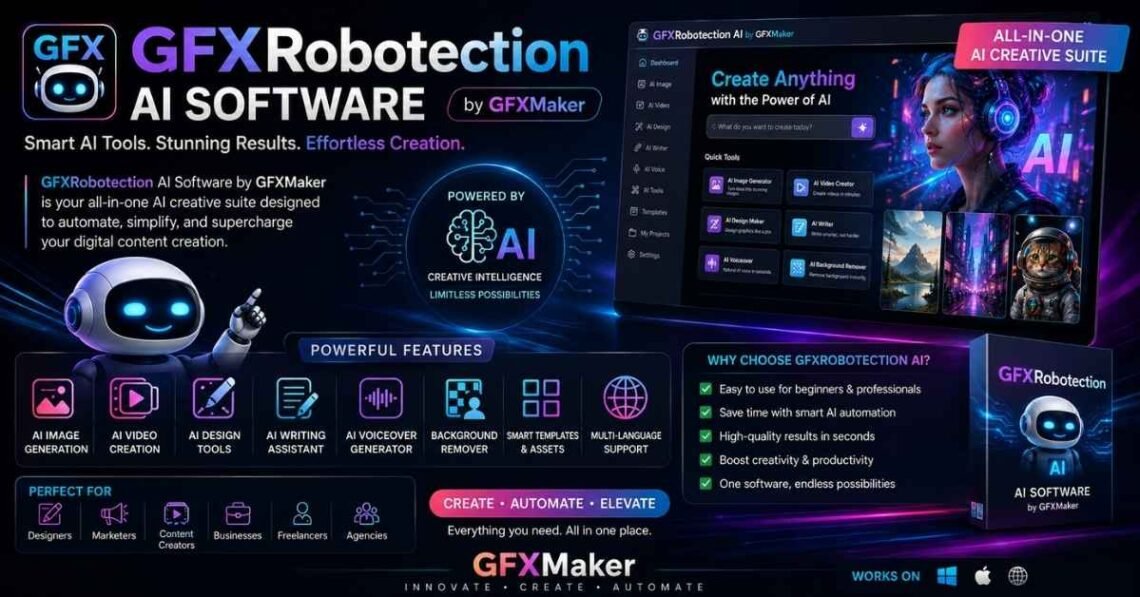
gfxrobotection ai software by gfxmaker is an AI-powered digital artwork protection solution designed to help graphic designers, digital artists, freelancers, agencies, and businesses secure their creative assets from unauthorized copying, image theft, AI scraping, and copyright misuse. It combines technologies such as Artificial Intelligence (AI), Machine Learning, Computer Vision, Digital Fingerprinting, Perceptual Hashing, Metadata Analysis, and Real-Time Monitoring to strengthen digital ownership and simplify creative asset management. While many of its capabilities are presented by the developer, users should always verify the latest features and compatibility through official documentation before relying on them for critical copyright protection.
As AI-generated content becomes more common, protecting logos, illustrations, social media graphics, marketing materials, and brand assets has become increasingly important. Traditional methods like visible watermarks or manual copyright registration often fall short against modern AI-powered image scraping tools. This guide explains how GFXRobotection works, its core features, supported formats, practical use cases, and whether it is the right choice for your creative workflow.
What Is GFXRobotection AI Software by GFXMaker?
GFXRobotection AI Software by GFXMaker is a cloud-based AI protection platform created to help safeguard digital artwork and other creative files. Instead of relying only on traditional watermarking, it uses AI-powered detection, digital fingerprinting, and content ownership verification to improve the security of digital assets.
The software is intended for anyone who creates or manages visual content, including:
- Graphic designers
- Digital artists
- Freelancers
- Design agencies
- Marketing teams
- Brand owners
- Content creators
- E-commerce businesses
Its primary goal is to help users protect digital artwork, monitor potential misuse, and strengthen copyright management without disrupting their normal design workflow.
Who Developed GFXMaker?
GFXMaker is presented as a creative software platform focused on helping professionals improve their graphic design workflow with AI-powered tools. GFXRobotection is positioned as one of its security-focused solutions, aiming to address growing concerns around AI image scraping, content theft, and digital copyright protection.
Why Was the Software Created?
Modern creators face challenges that were less common just a few years ago:
- AI models can scrape publicly available images.
- Artwork is frequently reposted without permission.
- Logos and brand graphics are copied by competitors.
- Designers often struggle to prove original ownership.
GFXRobotection aims to reduce these risks by adding an intelligent layer of protection that goes beyond basic watermarking.
How Does GFXRobotection AI Software Work?
Unlike conventional protection tools, GFXRobotection combines multiple technologies instead of depending on a single security method.
AI-Based Image Analysis
The platform uses Artificial Intelligence and Computer Vision to analyze the visual structure of an image rather than relying only on filenames or metadata.
This approach allows the system to recognize visual similarities even if an image has been resized, compressed, or slightly modified.
Digital Fingerprinting
One of the software’s most important technologies is Digital Fingerprinting.
Every uploaded asset receives a unique digital signature that acts like an identity card for that image.
Benefits include:
- Better ownership verification
- Faster asset authentication
- Improved copyright management
- Easier content tracking
Perceptual Hashing
Perceptual Hashing creates a mathematical representation of an image based on its visual characteristics instead of its file data.
For example, if someone changes:
- Image dimensions
- Brightness
- Compression level
- Minor colors
the perceptual hash may still recognize it as the same artwork.
This makes it more effective than traditional checksum methods for detecting modified copies.
Metadata Protection
Metadata contains important information such as:
| Metadata Type | Purpose |
|---|---|
| Author Name | Identifies the creator |
| Copyright Information | Indicates ownership |
| Creation Date | Records when the file was created |
| Licensing Details | Defines permitted usage |
| Keywords | Improves asset organization |
Proper metadata management strengthens ownership records, although metadata alone should not be relied upon as the only protection method.
Real-Time Monitoring
Many AI-powered protection platforms use real-time monitoring to watch for potential misuse of protected assets.
Depending on the implementation, monitoring may include:
- Duplicate image detection
- Similar image recognition
- Copyright monitoring
- Content ownership verification
- Image theft alerts
Copyright Verification Process
The overall workflow generally follows these steps:
| Step | Process |
|---|---|
| 1 | Upload artwork |
| 2 | AI analyzes the image |
| 3 | Digital fingerprint is generated |
| 4 | Metadata is recorded |
| 5 | Protection settings are applied |
| 6 | Monitoring begins |
| 7 | Ownership records help support copyright claims when needed |
Key Features of GFXRobotection AI Software
GFXRobotection combines several technologies to create a comprehensive AI artwork protection solution.
AI Artwork Protection
The software is designed to help protect:
- Logos
- Illustrations
- Social media graphics
- Website graphics
- Marketing materials
- Product images
- Brand assets
- Digital artwork
Instead of only preventing copying, it focuses on identifying and tracking creative assets.
Invisible Watermark Technology
Unlike visible watermarks that can affect the appearance of artwork, Invisible Watermarking embeds information that is generally hidden from normal viewing.
Potential advantages include:
- Preserves design quality
- Supports ownership verification
- Makes unauthorized copying easier to investigate
Duplicate Image Detection
Using Image Recognition, Machine Learning, and Pattern Recognition, the platform may identify duplicate or highly similar images even after minor edits.
This helps creators monitor:
- Reposted artwork
- Modified designs
- Unauthorized copies
- Duplicate marketing graphics
AI Scraping Protection
One of today’s biggest concerns is AI Scraping.
Large AI systems often collect publicly available images for analysis or training.
Although no software can guarantee complete prevention of scraping, intelligent monitoring and ownership verification can provide stronger evidence of originality and help creators manage their digital rights.
Cloud-Based Security
Cloud infrastructure offers several practical benefits:
- Access from multiple devices
- Centralized asset management
- Automatic synchronization
- Secure storage
- Collaboration support
Copyright Monitoring
Rather than manually searching for copied work, creators can organize and monitor their assets more efficiently through centralized management.
Benefits include:
- Faster identification of suspicious use
- Better organization
- Simplified ownership records
- Improved copyright management
Ownership Verification
Ownership verification is especially valuable for:
- Freelancers delivering client work
- Agencies managing large projects
- Businesses protecting brand assets
- Content creators publishing original graphics
Maintaining clear records can strengthen copyright claims if disputes arise.
Dashboard and Reporting
A centralized dashboard typically helps users:
- Organize projects
- Manage protected assets
- Track monitoring activity
- Review reports
- Maintain digital asset libraries
A clean dashboard also improves the overall User Experience (UX) and supports more efficient workflows.
Automation Tools
Automation reduces repetitive manual work.
Examples include:
- Automatic asset scanning
- Scheduled monitoring
- Metadata organization
- Batch processing
- Notification management
This allows designers to spend more time creating instead of manually tracking every file.
Multi-Device Access
Creative professionals often work across:
- Desktop computers
- Laptops
- Office workstations
- Remote environments
Cloud-based access enables projects to remain available wherever authorized users need them.
Who Should Use GFXRobotection AI Software?
Although the software is aimed at creative professionals, its applications extend across multiple industries.
Graphic Designers
Designers creating logos, brochures, advertisements, and branding materials can use AI-powered protection to strengthen ownership records and organize creative assets.
Freelancers
Freelancers often deliver hundreds of files each year.
Keeping those assets organized while maintaining proof of ownership can help reduce future disputes.
Design Agencies
Agencies manage thousands of creative files for multiple clients.
Features such as centralized dashboards, automation, collaboration tools, and cloud storage can improve productivity while helping protect client work.
Marketing Teams
Marketing departments regularly produce:
- Campaign graphics
- Social media content
- Email banners
- Promotional materials
- Digital advertisements
Protecting these assets helps preserve brand consistency and intellectual property.
Brand Owners
A company’s logo is one of its most valuable assets.
AI-assisted monitoring can help businesses maintain better visibility over how their visual identity is used online.
Content Creators
YouTubers, bloggers, influencers, and educators frequently publish original graphics that can be copied or reused without permission.
Maintaining organized ownership records can make copyright management easier over time.
Digital Artists
Artists investing significant time into original illustrations and concept art often seek stronger protection than traditional visible watermarks alone can provide.
E-commerce Businesses
Online stores rely heavily on original product images and promotional banners.
Protecting these visual assets helps reduce unauthorized reuse while supporting consistent branding.
Real-World Use Cases
Understanding practical applications makes it easier to evaluate whether GFXRobotection fits your workflow.
Protecting Client Designs
A freelance designer delivering branding packages to multiple clients can use centralized asset management to keep project files organized while maintaining ownership records for future reference.
Logo Security
Companies spend considerable resources developing recognizable logos. Protecting these files helps reduce the risk of unauthorized reuse and supports brand identity.
Portfolio Protection
Digital artists often showcase their best work online. AI-assisted monitoring and digital fingerprinting can add an additional layer of confidence when sharing portfolios publicly.
Social Media Graphics
Businesses publish hundreds of graphics across platforms each year. Organizing these assets while maintaining copyright information can simplify long-term management.
Digital Product Protection
Creators selling templates, icons, mockups, or printable products benefit from structured asset management and improved ownership verification.
Brand Asset Management
Large organizations often maintain libraries containing thousands of marketing materials. Centralized dashboards, cloud collaboration, and AI-assisted organization can make these collections easier to manage while supporting consistent branding.
Supported File Formats and Compatibility
Creative professionals work with many different file types, making compatibility an important consideration.
| File Format | Common Use |
|---|---|
| PSD | Adobe Photoshop projects |
| AI | Adobe Illustrator vector designs |
| SVG | Scalable vector graphics |
| PNG | Transparent graphics |
| JPG / JPEG | Web images and photography |
| Documents and print-ready designs | |
| EPS | Professional vector artwork |
Supporting multiple formats allows designers to protect a wide range of creative assets without changing their existing workflow.
Integrations with Popular Design Tools
A protection platform is most useful when it fits naturally into the software designers already use. While compatibility depends on the latest version and official support, GFXRobotection is designed around modern creative workflows rather than replacing existing design applications.
Adobe Photoshop
Adobe Photoshop remains one of the most widely used tools for creating and editing graphics. Designers working with PSD files often manage dozens or even hundreds of client projects, making organization and ownership verification essential.
Potential workflow benefits include:
- Managing Photoshop assets
- Organizing project libraries
- Protecting layered artwork
- Maintaining metadata
- Supporting copyright documentation
Adobe Illustrator
For vector graphics, logos, and illustrations, Adobe Illustrator is an industry standard.
Creative professionals producing AI and EPS files can benefit from keeping brand assets organized while preserving ownership records.
Canva
Canva has become popular among marketers, educators, and small businesses because of its simplicity.
Businesses creating:
- Social media posts
- Presentations
- Flyers
- Marketing graphics
can organize these visual assets more efficiently while maintaining consistent branding.
Figma
Figma has transformed collaborative design by enabling multiple team members to work on projects simultaneously.
For agencies and product teams, combining collaborative workflows with organized asset management helps improve productivity.
Affinity Designer
Many freelancers and independent designers use Affinity Designer as an alternative to Adobe software. Protecting vector artwork and exported graphics remains equally important regardless of the design platform.
CorelDRAW
CorelDRAW continues to be widely used for print design, packaging, and signage. Businesses managing extensive design libraries can benefit from centralized organization and ownership tracking.
Benefits of Using GFXRobotection AI Software
Choosing a digital asset protection platform is about more than security. It should also improve workflow, save time, and reduce manual effort.
Saves Time
Manual copyright management can be time-consuming.
Instead of searching through folders or maintaining spreadsheets, centralized organization helps creative professionals locate and manage assets more efficiently.
Reduces Image Theft Risks
No software can completely eliminate image theft. However, maintaining ownership records, digital fingerprints, and organized asset libraries strengthens your ability to demonstrate originality if disputes arise.
Improves Copyright Protection
Combining technologies such as:
- Digital Fingerprinting
- Metadata Analysis
- AI Detection
- Perceptual Hashing
creates stronger evidence of ownership than relying solely on visible watermarks.
Better Creative Workflow
Modern designers often work across multiple projects simultaneously.
A centralized system can help with:
- File organization
- Asset categorization
- Version management
- Team collaboration
- Workflow automation
Supports Collaboration
Design agencies frequently involve:
- Designers
- Project managers
- Marketing teams
- Clients
Keeping everyone aligned through organized asset libraries can reduce confusion and improve productivity.
Strengthens Brand Integrity
Businesses invest heavily in their visual identity.
Protecting logos, product images, advertising graphics, and marketing materials helps maintain brand consistency while reducing unauthorized reuse.
Advantages and Limitations
Every software solution has strengths and weaknesses. Understanding both provides a more balanced evaluation.
Advantages
| Advantage | Why It Matters |
|---|---|
| AI-powered monitoring | Helps organize and monitor digital assets. |
| Digital fingerprinting | Supports ownership verification. |
| Cloud-based platform | Access projects from multiple locations. |
| Automation | Reduces repetitive manual work. |
| Centralized dashboard | Improves organization. |
| Multi-format support | Works with common design file types. |
| Collaboration tools | Helpful for agencies and teams. |
| Scalable workflows | Suitable for growing creative businesses. |
Limitations
Like many AI-powered tools, there are practical limitations users should understand.
- No software can guarantee complete prevention of image theft.
- AI scraping cannot always be blocked entirely.
- Copyright laws vary between countries.
- Manual copyright registration may still be necessary for stronger legal protection.
- Feature availability can change over time as the software evolves.
Being aware of these limitations helps set realistic expectations.
GFXRobotection AI Software vs Traditional Protection Methods
Many designers rely on traditional techniques to protect their work. Comparing these methods highlights where AI-assisted solutions may add value.
| Protection Method | Strengths | Limitations |
|---|---|---|
| Visible Watermark | Easy to add | Can be cropped or removed |
| Metadata | Stores ownership information | Can be stripped during export |
| Manual Copyright Registration | Strong legal documentation | Time-consuming |
| Reverse Image Search | Finds some copied images | Requires manual searching |
| AI-Powered Monitoring | Organizes assets and supports ongoing monitoring | Does not guarantee prevention of misuse |
Rather than replacing traditional methods, AI-powered protection often works best as part of a layered security strategy.
GFXRobotection vs Popular Alternatives
Creative professionals frequently compare tools before adopting new software.
| Software | Best For | Main Strength |
|---|---|---|
| GFXRobotection | Asset protection | AI-powered artwork security |
| Adobe Creative Cloud | Professional design | Comprehensive creative suite |
| Canva | Quick graphic creation | Ease of use |
| Figma | UI/UX collaboration | Real-time teamwork |
| Affinity Designer | Cost-conscious professionals | One-time purchase model |
| CorelDRAW | Print and vector design | Professional illustration tools |
It is important to note that these applications serve different purposes. Photoshop, Canva, and Figma focus primarily on creating designs, whereas GFXRobotection focuses on protecting and managing creative assets.
Security Technologies Behind GFXRobotection
The platform combines several technologies that contribute to digital artwork protection.
Artificial Intelligence
AI analyzes image characteristics, helping organize and identify visual assets more intelligently than manual methods.
Machine Learning
Machine Learning enables systems to recognize patterns across large collections of graphics, improving detection accuracy over time.
Computer Vision
Computer Vision allows software to “understand” images by examining shapes, colors, layouts, and visual patterns.
Digital Fingerprinting
Unlike filenames, digital fingerprints remain associated with an image based on its characteristics, making them useful for ownership verification.
Perceptual Hashing
Perceptual hashing creates a mathematical signature based on how an image looks rather than how its file is stored.
This makes it useful when detecting visually similar images that have undergone minor edits.
Encryption
Encryption helps protect stored information by making unauthorized access more difficult.
Cloud Security
Cloud-based infrastructure often includes security practices such as:
- Access controls
- Authentication
- Backup systems
- Secure storage
- Permission management
Can GFXRobotection Prevent AI Scraping?
This is one of the most common questions users ask.
The short answer is not entirely.
Understanding AI Scraping
AI scraping refers to automated systems collecting publicly available images from websites for analysis or machine learning purposes.
Examples include:
- Public portfolios
- Blog images
- Product photographs
- Marketing graphics
- Social media content
What GFXRobotection Can Do
The software may help by:
- Organizing ownership records
- Supporting digital fingerprinting
- Improving copyright documentation
- Helping creators manage digital assets
- Strengthening evidence of originality
What It Cannot Guarantee
No current software can guarantee:
- Complete prevention of online copying
- Full blocking of AI crawlers
- Automatic legal enforcement
- Worldwide copyright compliance
For maximum protection, creators should combine AI-assisted tools with good publishing practices and, where appropriate, formal copyright registration.
Does GFXRobotection Help Protect Copyright?
Yes—but understanding its role is important.
Copyright exists automatically in many jurisdictions once original creative work is created. However, proving ownership can become difficult if disputes arise.
GFXRobotection supports this process by helping creators maintain organized records.
Ownership Documentation
Maintaining:
- Creation dates
- Metadata
- Digital fingerprints
- Project organization
can make ownership easier to demonstrate.
Licensing
Businesses distributing creative assets often establish licensing agreements that define how files may be used.
Organized documentation helps manage these licenses more effectively.
Intellectual Property Management
For agencies handling thousands of creative assets, structured management improves efficiency while supporting long-term intellectual property organization.
Pricing, Plans, and Availability
Pricing information for software products changes frequently. Before making a purchasing decision, always verify the latest details through the official GFXMaker resources.
A typical SaaS pricing structure may include:
| Plan | Suitable For |
|---|---|
| Free Trial | Users evaluating the platform |
| Individual Plan | Freelancers and independent designers |
| Professional Plan | Small businesses and agencies |
| Enterprise Plan | Large organizations with multiple teams |
When comparing subscription plans, consider:
- Storage limits
- Number of users
- Collaboration features
- Monitoring capabilities
- API availability
- Customer support
- Security features
Choosing the right plan depends on the size of your creative workflow rather than simply selecting the most expensive option.
Installation and Getting Started
Getting started with GFXRobotection AI Software by GFXMaker should be straightforward if you already use cloud-based creative tools. While the exact interface and onboarding process may change with future updates, the general workflow follows a familiar pattern used by many SaaS platforms.
Create Your Account
The first step is creating a user account. Depending on the available plans, you may have options such as:
- Free trial
- Individual account
- Team workspace
- Enterprise account
Use a strong password and enable any available multi-factor authentication (MFA) to improve account security.
Configure Your Workspace
Once logged in, organize your workspace before uploading files.
A well-structured workspace often includes:
- Client folders
- Brand asset libraries
- Project categories
- Team permissions
- Folder naming conventions
Good organization makes monitoring and managing assets much easier over time.
Upload Digital Assets
Most creators work with multiple file formats every day.
Common uploads include:
- PSD
- AI
- SVG
- PNG
- JPG
- JPEG
- EPS
Uploading assets into one centralized location helps simplify creative asset management.
Apply Protection Settings
Once files are uploaded, configure protection preferences based on your workflow.
Typical settings may include:
- Digital fingerprint generation
- Metadata recording
- Asset categorization
- Monitoring preferences
- Notification settings
Monitor Your Dashboard
The dashboard serves as the central location for managing protected assets.
Here you can typically:
- View uploaded artwork
- Organize projects
- Manage creative libraries
- Review monitoring activity
- Track ownership records
- Export reports if available
A clean dashboard improves both User Experience (UX) and productivity.
Best Practices for Protecting Digital Artwork
Technology alone cannot fully protect creative work. Combining software with smart habits creates a stronger defense against unauthorized use.
Keep Original Source Files
Always retain your original project files.
Examples include:
- PSD files
- AI files
- RAW images
- Editable vector artwork
Original files often provide valuable evidence of authorship.
Preserve Metadata
Metadata can contain information such as:
- Creator name
- Copyright details
- Creation date
- Licensing information
- Project information
Although metadata can sometimes be removed during editing or exporting, keeping it intact whenever possible strengthens ownership documentation.
Use Multiple Protection Methods
Professional designers rarely depend on a single security technique.
Instead, combine:
- Digital fingerprinting
- Invisible watermarking
- Metadata
- Copyright registration
- Cloud backups
- Asset monitoring
Layered protection provides better long-term security.
Maintain Secure Backups
Every creative business should follow the 3-2-1 backup strategy:
| Backup Rule | Explanation |
|---|---|
| 3 Copies | Maintain three copies of important files. |
| 2 Storage Types | Store files on two different storage media. |
| 1 Offsite Backup | Keep one backup in a secure cloud location. |
This reduces the risk of losing valuable artwork due to hardware failure or accidental deletion.
Organize Your Asset Library
As projects grow, finding the correct version of a file becomes more difficult.
Good organization includes:
- Consistent folder names
- Project IDs
- Client folders
- Version numbers
- Archive folders
Proper organization saves hours of work over time.
Register Copyright When Appropriate
AI-powered monitoring helps document ownership, but formal copyright registration may provide stronger legal protection depending on your country’s laws.
For valuable commercial work, registration is often worth considering.
Common Mistakes to Avoid
Many creators unknowingly make mistakes that reduce the effectiveness of their protection strategy.
Relying Only on Visible Watermarks
Visible watermarks discourage casual copying but are often easy to crop or edit.
A layered approach is generally more effective.
Ignoring Metadata
Some designers remove metadata while optimizing images for websites.
Doing so may eliminate useful ownership information.
Poor File Organization
Searching through hundreds of unnamed files wastes valuable time.
Instead of names like:
design-final-new2.png
use descriptive filenames such as:
BrandLogo_ClientA_2026_v3.png
This makes files easier to locate and manage.
Weak Passwords
Creative assets often represent months of work.
Protect accounts using:
- Strong passwords
- Password managers
- Multi-factor authentication
- Secure recovery methods
No Backup Strategy
Many professionals assume cloud storage alone is sufficient.
However, maintaining independent backups remains an essential best practice.
Assuming AI Can Prevent Everything
AI tools are powerful, but they are not magic.
No software can guarantee:
- Zero image theft
- Complete AI scraping prevention
- Automatic copyright enforcement
- Perfect ownership protection
Understanding these limitations helps set realistic expectations.
Expert Tips for Graphic Designers
Experienced designers focus on prevention rather than reacting after problems occur.
Build a Standard Workflow
A consistent workflow reduces mistakes.
Example:
- Create artwork.
- Save editable files.
- Export delivery versions.
- Preserve metadata.
- Upload to secure storage.
- Organize assets.
- Maintain backups.
Following the same process for every project improves efficiency.
Protect Brand Assets Separately
Not every file has the same value.
Prioritize protection for:
- Company logos
- Product packaging
- Marketing campaigns
- Advertising graphics
- Visual identities
These assets usually have the highest commercial importance.
Deliver Client Files Professionally
When completing projects:
- Organize folders clearly.
- Include licensing information.
- Maintain project documentation.
- Archive final versions.
- Keep editable originals.
Professional delivery creates a better client experience while protecting your own work.
Monitor Your Portfolio
Many designers publish portfolios on:
- Personal websites
- Behance
- Dribbble
- Social media
Review these portfolios periodically to ensure your work remains properly attributed.
Educate Clients
Some clients unintentionally misuse creative files.
Provide simple guidance explaining:
- Appropriate file usage
- Licensing terms
- Editing permissions
- Redistribution policies
Clear communication prevents misunderstandings later.
LEARN MORE: AI Graphic Design GFXRobotection
Case Study: Protecting a Freelance Designer’s Brand Assets
Scenario: Sarah is a freelance graphic designer who creates logos, social media graphics, and marketing materials for small businesses.
Before improving her asset management process, she stored files across multiple hard drives with inconsistent naming conventions. Finding an old project often took several minutes, and proving which version was the original could be difficult.
She reorganized her workflow by:
- Creating structured client folders.
- Preserving original PSD and AI files.
- Maintaining metadata where possible.
- Backing up projects using the 3-2-1 backup strategy.
- Keeping documented ownership records for completed work.
As a result, Sarah could retrieve files more quickly, maintain better project documentation, and respond confidently whenever clients requested updates or previous versions. While no software can eliminate every copyright risk, combining organized workflows with AI-assisted asset management significantly improved her efficiency.
Quick Comparison: Traditional vs AI-Assisted Protection
| Feature | Traditional Methods | AI-Assisted Protection |
|---|---|---|
| Visible Watermarks | ✔ | ✔ |
| Digital Fingerprinting | ✖ | ✔ |
| Perceptual Hashing | ✖ | ✔ |
| Metadata Management | Limited | ✔ |
| Asset Organization | Manual | Automated |
| Real-Time Monitoring | Manual | AI-Assisted |
| Workflow Automation | ✖ | ✔ |
| Team Collaboration | Limited | Better Support |
| Ownership Documentation | Manual | Centralized |
| Cloud Accessibility | Depends | Cloud-Based |
Why Modern Designers Need More Than Watermarks
“Protecting digital artwork today is no longer just about preventing copies—it’s about maintaining clear ownership, organized records, and a workflow that supports your creative business.”
As AI-generated content, automated scraping tools, and online sharing continue to grow, designers need a combination of digital fingerprinting, metadata management, copyright documentation, secure cloud storage, and organized asset management to safeguard their work effectively.
A thoughtful, layered approach offers far greater long-term value than relying on a single protection method.
Frequently Asked Questions
Is GFXRobotection AI Software by GFXMaker legitimate?
Based on publicly available information, GFXRobotection AI Software by GFXMaker is presented as an AI-powered solution for protecting digital artwork and creative assets. However, before adopting any software for business-critical workflows, you should verify its latest features, pricing, support, and documentation through the official GFXMaker resources.
How does GFXRobotection AI Software work?
The software combines several technologies, including:
- Artificial Intelligence (AI)
- Machine Learning
- Computer Vision
- Digital Fingerprinting
- Perceptual Hashing
- Metadata Analysis
- Cloud Security
- Real-Time Monitoring
These technologies work together to help organize digital assets, support ownership verification, and improve creative workflow management.
Can GFXRobotection stop image theft completely?
No.
No AI-powered protection platform can guarantee complete prevention of image theft, copyright infringement, or AI scraping.
Instead, tools like GFXRobotection aim to:
- Strengthen ownership documentation
- Improve asset organization
- Support copyright management
- Help creators monitor their digital artwork
Using multiple protection methods remains the best practice.
Does GFXRobotection replace copyright registration?
No.
Copyright registration and AI-powered monitoring serve different purposes.
Copyright registration may provide stronger legal protection depending on your country’s laws, while GFXRobotection focuses on organizing, documenting, and managing creative assets.
For valuable commercial projects, using both approaches together is often the most effective strategy.
Which file formats are commonly supported?
Creative professionals typically work with formats such as:
- PSD
- AI
- SVG
- PNG
- JPG
- JPEG
- EPS
Support may vary depending on future software updates, so always review the latest documentation.
Is GFXRobotection suitable for freelancers?
Yes.
Freelancers often handle dozens of client projects simultaneously.
A centralized dashboard, organized asset libraries, digital ownership records, and automated workflows can simplify project management while improving professionalism.
Is it useful for design agencies?
Absolutely.
Agencies benefit from:
- Team collaboration
- Centralized asset management
- Cloud-based access
- Project organization
- Creative workflow automation
- Digital copyright documentation
These features become increasingly valuable as agencies grow.
Does it work with Adobe Photoshop, Canva, and Figma?
The platform is designed around modern creative workflows and commonly used graphic design software.
Before integrating it into your production environment, verify the latest compatibility information with the official product documentation.
Can AI prevent AI scraping?
Not entirely.
Current AI technology cannot completely prevent automated scraping of publicly available images.
However, maintaining:
- Digital fingerprints
- Metadata
- Copyright information
- Organized ownership records
can strengthen your ability to demonstrate originality if disputes arise.
Is GFXRobotection worth using in 2026?
If your work depends on valuable digital assets, organized asset management and AI-assisted protection can provide meaningful workflow improvements.
Its value ultimately depends on:
- Your workflow
- Number of projects
- Team size
- Asset volume
- Security requirements
- Budget
Pros and Cons at a Glance
| Pros | Cons |
|---|---|
| AI-powered protection workflow | Cannot guarantee complete prevention of image theft |
| Digital fingerprinting | AI scraping cannot be fully blocked |
| Supports organized asset management | Some capabilities depend on implementation |
| Cloud-based accessibility | Subscription costs may vary |
| Workflow automation | Official compatibility should always be verified |
| Centralized dashboard | Legal copyright protection still depends on local laws |
| Suitable for freelancers and agencies | Internet connectivity may be required for cloud features |
| Improves ownership documentation | Feature availability may change with updates |
Key Takeaways
Before deciding whether GFXRobotection fits your workflow, remember these important points:
- ✔ AI-powered monitoring complements—but does not replace—traditional copyright protection.
- ✔ Digital fingerprinting and perceptual hashing provide stronger ownership documentation than visible watermarks alone.
- ✔ Maintaining metadata, backups, and organized project libraries remains essential.
- ✔ Layering multiple protection methods is more effective than relying on a single tool.
- ✔ Creative professionals should balance convenience with realistic expectations about what AI can and cannot do.
Final Verdict: Is GFXRobotection AI Software by GFXMaker Worth Considering?
GFXRobotection AI Software by GFXMaker addresses a growing challenge faced by designers, agencies, and content creators: protecting valuable digital artwork in an era of AI-generated content, automated scraping, and widespread online sharing.
Rather than acting as a replacement for copyright law or traditional security practices, it serves as an AI-assisted creative asset management solution. Technologies such as Machine Learning, Computer Vision, Digital Fingerprinting, Perceptual Hashing, Metadata Analysis, and Cloud Security can help users organize projects, document ownership, and streamline digital workflows.
Who Will Benefit Most?
The platform is particularly suitable for:
- Graphic designers managing multiple client projects
- Freelancers handling digital deliverables
- Design agencies collaborating across teams
- Marketing departments protecting campaign assets
- Brand owners safeguarding logos and visual identity
- Content creators publishing original graphics
- Digital artists building online portfolios
- E-commerce businesses protecting product imagery
Key Strengths
Its biggest strengths include:
- AI-assisted asset management
- Digital fingerprinting
- Workflow automation
- Centralized dashboards
- Cloud-based collaboration
- Ownership verification
- Support for common design formats
- Scalable workflows for individuals and teams
Important Limitations
Like any software, it has limitations.
Users should understand that:
- It cannot eliminate copyright infringement.
- It cannot guarantee prevention of AI scraping.
- It does not replace formal copyright registration.
- Long-term effectiveness depends on responsible file management and layered security practices.
Conclusion
As the digital design industry continues to evolve, protecting creative work has become just as important as creating it. Designers today face challenges that extend beyond traditional image theft, including AI scraping, unauthorized redistribution, and managing increasingly large libraries of digital assets.
GFXRobotection AI Software by GFXMaker aims to address these challenges by combining Artificial Intelligence, Machine Learning, Computer Vision, Digital Fingerprinting, Perceptual Hashing, Metadata Analysis, and Cloud-Based Security into a single workflow. For freelancers, agencies, businesses, and content creators, this approach can improve organization, strengthen ownership documentation, and simplify creative asset management.
However, the most effective protection strategy is never a single tool. Combining AI-assisted monitoring with strong passwords, secure backups, metadata preservation, formal copyright registration where appropriate, and well-organized project management provides a more comprehensive defense for valuable digital artwork.
If your goal is to build a professional, scalable, and secure creative workflow, GFXRobotection is worth evaluating alongside your existing design tools. As with any software, review the latest official documentation, compare available plans, and choose the solution that best aligns with your workflow, security requirements, and long-term creative objectives.