Looking to unlock the full potential of your gaming mouse? Attack Shark X3 software is the official configuration tool that lets you customize DPI levels, button assignments, RGB lighting, macros, polling rate, and other advanced features of the Attack Shark X3 wireless gaming mouse. If you own this mouse, installing the software is the easiest way to personalize its performance for gaming, work, or everyday use.
In this guide, you’ll learn how to download Attack Shark X3 software, whether it’s safe to install, the best settings for gaming, Linux compatibility, troubleshooting tips, and how to keep your software up to date.
What Is Attack Shark X3 Software?
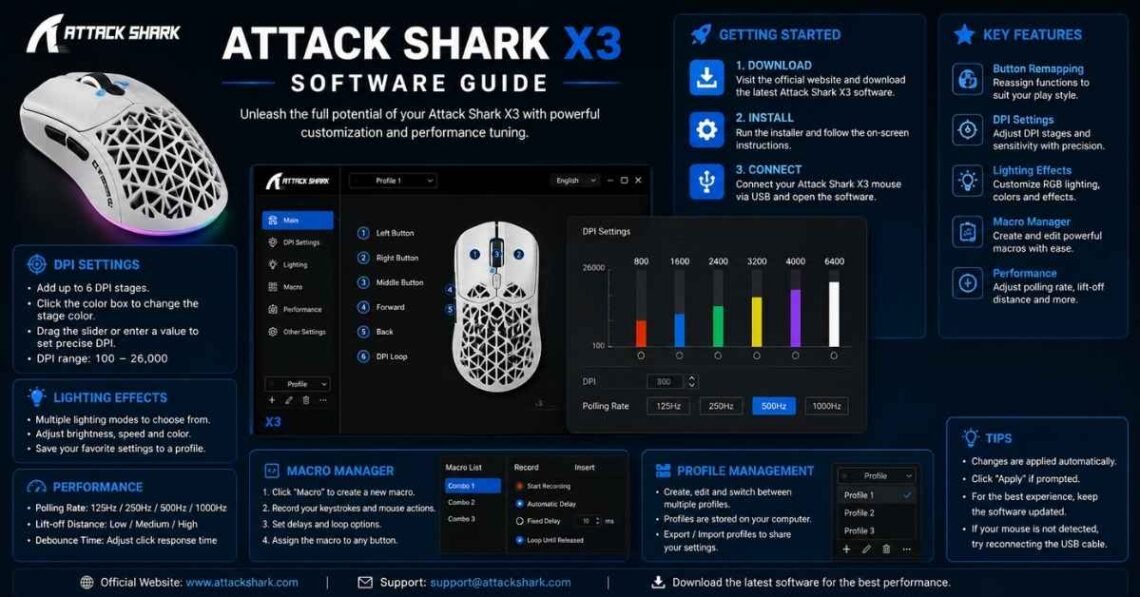
Attack Shark X3 software is a desktop application designed to configure the Attack Shark X3 gaming mouse. Instead of relying on factory settings, users can adjust the mouse to match their playing style or workflow.
The software allows you to:
- Customize DPI levels
- Create gaming macros
- Remap mouse buttons
- Adjust polling rate
- Configure RGB lighting (if supported)
- Save multiple user profiles
- Update firmware
These features make the software especially useful for gamers, designers, and professionals who need precise mouse control.
Key Features of Attack Shark X3 Software
The software offers several customization options that improve both gaming performance and productivity.
DPI Customization
You can configure multiple DPI stages and switch between them instantly.
Common DPI presets include:
- 400 DPI – Competitive FPS gaming
- 800 DPI – General gaming
- 1200 DPI – Office work
- 1600 DPI – Everyday browsing
- 3200+ DPI – High-resolution displays
Having multiple DPI profiles makes switching between different tasks much easier.
Button Remapping
The software allows every programmable button to perform different functions.
You can assign:
- Keyboard shortcuts
- Multimedia controls
- Browser navigation
- Application commands
- Custom macros
This feature improves efficiency during gaming and daily work.
Macro Recording
One of the most useful features is macro creation.
Users can record a sequence of keystrokes and assign them to a single mouse button. This is particularly useful for:
- MMO games
- Productivity shortcuts
- Video editing
- Repetitive office tasks
Always use macros responsibly and follow the rules of any game you play.
Polling Rate Adjustment
Polling rate controls how often the mouse communicates with your computer.
Available options commonly include:
- 125 Hz
- 250 Hz
- 500 Hz
- 1000 Hz
Higher polling rates provide smoother cursor movement but may consume slightly more power.
How to Download Attack Shark X3 Software
Many new users ask how to download Attack Shark X3 software safely.
Follow these steps:
- Visit the official Attack Shark support or download page.
- Locate the X3 gaming mouse model.
- Download the latest software version compatible with your operating system.
- Extract the downloaded file if it comes in a ZIP archive.
- Run the installer.
- Restart your computer if prompted.
- Connect your Attack Shark X3 mouse and launch the software.
Downloading only from the manufacturer’s official website helps avoid modified or malicious installers.
How to Get Attack Shark X3 Software
If your mouse didn’t include installation media, don’t worry.
You can usually get the software by:
- Downloading it from the official Attack Shark website
- Accessing the support section for your mouse model
- Checking firmware download pages
- Using the QR code included with newer packaging
Avoid downloading software from unofficial websites unless you completely trust the source.
Is Attack Shark X3 Software Safe?
A common question is is Attack Shark X3 software safe?
Yes. If you download it directly from the official manufacturer, the software is generally considered safe. Official releases are designed specifically for the X3 mouse and are regularly updated to improve compatibility and stability.
For maximum security:
- Download only from official sources.
- Keep your antivirus enabled.
- Verify digital signatures when available.
- Install the latest software version.
- Avoid cracked or modified installers.
These simple precautions help protect your system.
Best Attack Shark X3 Software Settings
The best Attack Shark X3 software settings depend on how you use your mouse.
For FPS Games
- DPI: 400–800
- Polling Rate: 1000 Hz
- Mouse Acceleration: Off
- Angle Snapping: Disabled
- Lift-Off Distance: Low
These settings provide greater precision and consistency.
For MOBA and MMO Games
- DPI: 800–1600
- Polling Rate: 1000 Hz
- Custom Macros: Enabled
- Side Buttons: Skill shortcuts
This setup improves reaction time and workflow.
For Office Work
- DPI: 1200–1600
- Polling Rate: 500 Hz
- Macros: Productivity shortcuts
- Button Mapping: Browser controls
This balance offers smooth cursor movement without sacrificing battery life.
Attack Shark X3 Software Update Guide
Keeping your software updated improves stability and hardware compatibility.
An Attack Shark X3 software update may include:
- Bug fixes
- Performance improvements
- Firmware enhancements
- New customization features
- Better operating system compatibility
Before updating:
- Save your mouse profiles.
- Download the newest version.
- Close the software completely.
- Install the update.
- Restart your computer if required.
Regular updates help ensure optimal performance.
Does Attack Shark X3 Software Support Linux?
Many users search for Attack Shark X3 software Linux compatibility.
At the time of writing, the official software primarily supports Windows. Native Linux support is generally unavailable. However, basic mouse functions such as movement and clicking usually work without additional drivers because Linux includes standard USB HID support.
Some Linux users choose community-developed tools for limited customization, but advanced features like macros, firmware updates, or RGB controls may not function as they do on Windows. If Linux support is essential, check the manufacturer’s latest documentation before purchasing.
Common Problems and Fixes
Even reliable software can occasionally experience issues.
Software Doesn’t Detect the Mouse
Try these solutions:
- Reconnect the USB receiver.
- Use another USB port.
- Restart the software.
- Update mouse firmware.
- Restart your computer.
Settings Are Not Saving
This issue may occur because of insufficient permissions.
Possible fixes include:
- Run the software as Administrator.
- Reinstall the application.
- Update to the latest version.
- Reset the mouse profile.
Firmware Update Fails
If an update doesn’t complete:
- Ensure the battery is charged.
- Keep the mouse connected during the process.
- Close unnecessary applications.
- Download the firmware again from the official source.
LEARN MORE: Error SusBlueZilla New Version
Tips for Better Performance
To get the best experience from Attack Shark X3 software:
- Keep firmware updated.
- Back up your profiles.
- Create separate gaming and work configurations.
- Use the highest stable polling rate.
- Clean the mouse sensor regularly.
- Avoid unnecessary background applications while gaming.
These small habits can improve responsiveness and reliability.
FAQs
What is Attack Shark X3 software used for?
Attack Shark X3 software lets you customize DPI, button assignments, macros, polling rate, RGB lighting (if supported), and firmware settings for the Attack Shark X3 gaming mouse.
How do I download Attack Shark X3 software?
Download it from the official Attack Shark support page for your specific X3 mouse model. Avoid unofficial download websites whenever possible.
Is Attack Shark X3 software safe?
Yes. The software is generally safe when downloaded directly from the manufacturer’s official website. Avoid modified or third-party installers.
What are the best Attack Shark X3 software settings?
For competitive FPS games, many users prefer 400–800 DPI, a 1000 Hz polling rate, low lift-off distance, and angle snapping disabled. Office users may prefer 1200–1600 DPI with a 500 Hz polling rate.
Does Attack Shark X3 software work on Linux?
The official software is primarily designed for Windows. While the mouse usually functions on Linux as a standard USB device, advanced customization features are generally not available through official Linux software.
How often should I update Attack Shark X3 software?
Check for updates every few months or whenever the manufacturer releases a new version. Updates often improve stability, compatibility, and overall performance.
Conclusion
Attack Shark X3 software is an essential companion for anyone who wants to get the most from the Attack Shark X3 gaming mouse. It provides powerful customization options, including DPI adjustments, macro creation, button remapping, firmware management, and performance tuning. Whether you’re searching for how to get Attack Shark X3 software, how to download Attack Shark X3 software, the best Attack Shark X3 software settings, or wondering is Attack Shark X3 software safe, using the official application is the best way to ensure a secure and optimized experience.
For the best results, always download the latest version from the official source, keep the software updated, and fine-tune your settings based on your gaming style or daily workflow.